
Our blog is reader-supported. When you buy through links on our site, we may earn an affiliate commission. Thank you for your support!
Solar-powered keyboards are game-changers for anyone who spends hours typing without wanting to constantly replace batteries. The Logitech K750 Solar Keyboard stands out as the top choice, offering reliable wireless connectivity and impressive battery life that can last months on a single charge. If you’re looking for options that blend durability, comfort, and solar efficiency, this guide will help you find the perfect keyboard to match your workspace.
Below we’ve compiled a comparison table featuring 8 of the best solar keyboards available today, each offering unique features for different use cases and preferences.
Our Top Picks
| PRODUCT IMAGE | PRODUCT | PRICE |
|---|---|---|
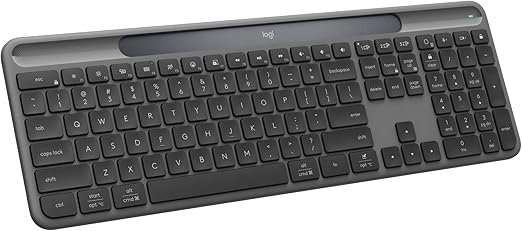 | Logitech Signature Slim Solar+ Wireless Keyboard K980 The Logitech Signature Slim Solar+ K980 represents the most significant leap forward in solar keyboard technology in years. Where previous solar keyboar… | CHECK PRICE |
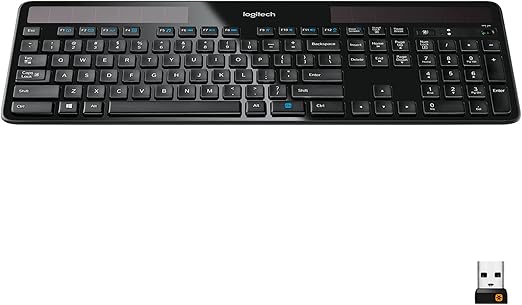 | Logitech K750 Wireless Solar Keyboard If the K980 is the newest solar keyboard, the Logitech K750 is the proven one. It has been around long enough to develop a genuine track record, and tha… | CHECK PRICE |
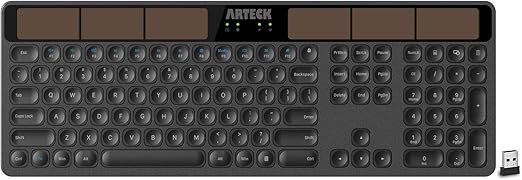 | Arteck Wireless Solar Keyboard Full Size This is the one to buy if you want solar without the Logitech price tag. The Arteck full-size solar keyboard connects via a 2.4GHz USB receiver and runs… | CHECK PRICE |
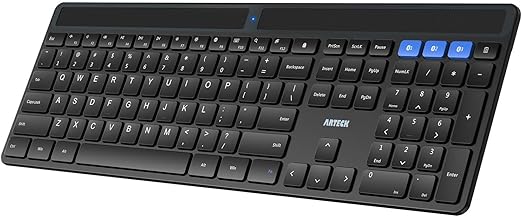 | Arteck Solar Bluetooth Multi-Device Keyboard Where the Arteck full-size model covers basic desktop use, this Bluetooth version is aimed squarely at people who juggle multiple devices. It pairs with… | CHECK PRICE |
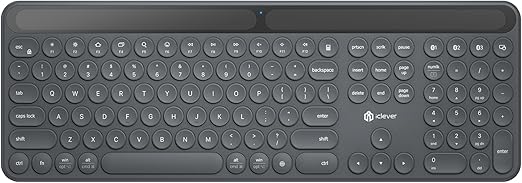 | iClever Solar Bluetooth Keyboard The iClever model stands out for its dual charging approach. Most solar keyboards rely on their panels alone with a USB backup. | CHECK PRICE |
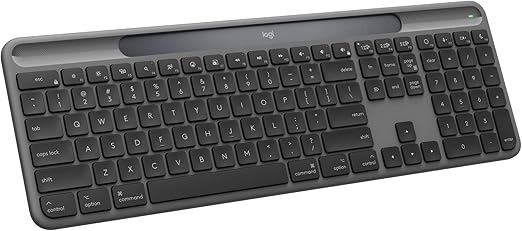 | Logitech Signature Slim Solar+ K980 for Mac The Mac version of the Signature Slim Solar+ K980 is essentially the same hardware as the Windows model with one critical difference: the layout is buil… | CHECK PRICE |
6 Best Solar Keyboards
1. Logitech Signature Slim Solar+ Wireless Keyboard K980
[IMAGE PLACEHOLDER: ASIN=B0FH88CY7L slug=logitech-signature-slim-solar-k980]
The Logitech Signature Slim Solar+ K980 represents the most significant leap forward in solar keyboard technology in years. Where previous solar keyboards required a dedicated strip of solar cells along the top, the K980 integrates its photovoltaic cells directly into the key panel itself, making the keyboard indistinguishable from a premium wireless model at a glance. It charges from any light source, including standard indoor office lighting, and Logitech claims up to 10 years of battery life with normal indoor use.
Connectivity is equally impressive. The K980 pairs with up to three devices via Bluetooth and switches between them with a single keypress, so you can bounce between your desktop, laptop, and tablet without reaching for separate keyboards. For Windows users, the dedicated multimedia controls and Windows-specific shortcut keys feel particularly well thought out. Typing feel is quiet and low-profile, which suits an open-plan office environment well.
Build quality matches the premium price. The slim aluminum-reinforced frame is rigid without being heavy, and the keycaps have a satisfying matte texture that resists fingerprint buildup better than most. Logitech’s support for the Logi Options+ software lets you remap keys and create custom shortcuts, adding a level of personalization most solar keyboards skip entirely.
The main caveat is cost. This sits at the top end of the solar keyboard price range, and if you are on a tight budget you will find the Arteck models lower down this list more than adequate. But if you want the best solar keyboard available for Windows in 2025, the K980 is it.
Features
- Solar + artificial light charging via integrated photovoltaic cells
- Bluetooth multi-device: pairs with up to 3 devices
- Up to 10 years battery life under typical indoor office lighting
- Low-profile, quiet keys with aluminum-reinforced slim frame
- Compatible with Logi Options+ for key remapping and shortcuts
- Windows-optimized layout with dedicated media and function keys
- Solar cells integrated into key panel, not just a strip at the top
- Excellent multi-device Bluetooth switching
- Premium build quality and matte keycaps
- Logi Options+ software support for customization
- Premium price compared to other solar keyboards
- Windows only, no Mac-specific layout on this version
2. Logitech K750 Wireless Solar Keyboard
[IMAGE PLACEHOLDER: ASIN=B004MF11MU slug=logitech-k750-wireless-solar-keyboard]
If the K980 is the newest solar keyboard, the Logitech K750 is the proven one. It has been around long enough to develop a genuine track record, and that record is overwhelmingly positive. The K750 uses a traditional solar strip across the top of the keyboard, which charges from both sunlight and indoor fluorescent or LED lighting. Logitech’s own “Solar App” (available for Windows) lets you check the battery level and see how much light the panel is currently receiving, a feature that sounds gimmicky but turns out to be genuinely useful when your desk moves or a monitor blocks the strip.
This is a no-Bluetooth model. It connects via Logitech’s Unifying USB receiver, which is a small 2.4GHz dongle that plugs into any USB port and stays there. That is a slight limitation if you want to switch devices, but it is also a strength if you use the same desktop every day and want a dead-reliable wireless connection. The Unifying receiver can pair with up to six compatible Logitech devices, so if you already use a Logitech mouse you can run both from a single dongle.
Typing feel is where the K750 really wins fans. The keys have a satisfying travel depth that most ultra-slim solar keyboards sacrifice, and the overall feel is closer to a traditional office keyboard than many of its competitors. The layout is full-size with a numpad, which productivity-focused users will appreciate. For heavy typers spending eight hours a day at a desk, this physical feel matters more than thin-profile aesthetics.
At its current price it is exceptional value, particularly given its proven longevity. The only meaningful knock is the lack of Bluetooth.
Features
- Solar strip charges from indoor lighting and sunlight
- Logitech Unifying receiver, 2.4GHz wireless
- Full-size layout with numpad
- Compatible with Logitech Solar App for battery/light monitoring
- Spill-resistant design
- Works with Windows 10/11 and Windows 7/8
- Proven long-term reliability with genuine user track record
- Satisfying key travel, closer to traditional keyboard feel
- Full-size with numpad included
- Excellent value at current pricing
- No Bluetooth, single device via USB dongle only
- Windows only, no Mac support
3. Arteck Wireless Solar Keyboard Full Size
[IMAGE PLACEHOLDER: ASIN=B07TMDSS3Q slug=arteck-wireless-solar-keyboard-full-size]
This is the one to buy if you want solar without the Logitech price tag. The Arteck full-size solar keyboard connects via a 2.4GHz USB receiver and runs on a solar-charged battery that Arteck claims can power the keyboard indefinitely under normal indoor lighting. In practice, the solar strip across the top does its job well as long as your desk gets reasonable light exposure. Put it in a dim corner and you may eventually need to charge via the included USB cable, but most desk setups will never reach that point.
The layout is genuinely full-size with a dedicated numpad, which separates it from the compact models. Arteck has kept the key pitch and spacing close to standard, so there is almost no adjustment period coming from a conventional keyboard. The keys are quiet, the wireless range extends comfortably across a typical home office, and the receiver itself is small enough to leave plugged in permanently without being annoying.
What you give up at this price is multi-device support. This is a single-device keyboard and if you regularly switch between a PC and a tablet, you will be better served by the Arteck Bluetooth model below. But for a single desktop machine, particularly in a home or small office environment, it covers everything most users actually need.
Features
- Solar charging strip with USB-C backup charging port
- 2.4GHz wireless via USB receiver, up to 33 feet range
- Full-size layout including dedicated numpad
- Quiet, low-profile keys
- Compatible with Windows, Mac, Android, iOS
- Most affordable solar keyboard on this list
- Full-size with numpad at a budget price
- USB-C backup charging if light is insufficient
- Single-device only, no Bluetooth multi-device
- Build feels noticeably less premium than Logitech models
- Solar performance drops in low-light environments
4. Arteck Solar Bluetooth Multi-Device Keyboard
[IMAGE PLACEHOLDER: ASIN=B0DK3DXTSZ slug=arteck-solar-bluetooth-multi-device-keyboard]
Where the Arteck full-size model covers basic desktop use, this Bluetooth version is aimed squarely at people who juggle multiple devices. It pairs with up to three via Bluetooth and lets you switch with a dedicated hotkey in the top row. The solar charging works the same as the wired version, a strip across the top that handles most lighting conditions, with USB-C as a backup. The main practical difference is that Bluetooth introduces the occasional lag that 2.4GHz does not, though in regular typing it is imperceptible.
Layout-wise, Arteck has taken a slightly more compact approach here to keep the overall footprint manageable across different desk setups. The numpad is gone on most configurations, which is a trade-off worth knowing about before you buy. If you rely heavily on number entry, step up to the full-size model. But for general text work across a laptop, tablet, and phone, this is a genuinely convenient solution that costs considerably less than the Logitech equivalent.
Battery life in practice is excellent when the keyboard gets reasonable light exposure. Users consistently report weeks or months between needing to reach for the USB-C cable.
Features
- Solar charging strip with USB-C backup
- Bluetooth 5.0 multi-device: pairs with up to 3 devices
- Compatible with Windows, Mac, iOS, Android
- Quiet scissor-switch keys
- Compact layout (varies by configuration)
- Multi-device Bluetooth at a much lower price than Logitech
- Works across Windows, Mac, iOS, and Android
- Solar plus USB-C backup for reliable charging
- No numpad on compact configuration
- Bluetooth can occasionally drop versus 2.4GHz reliability
- Lighter build than Logitech models
5. iClever Solar Bluetooth Keyboard
[IMAGE PLACEHOLDER: ASIN=B0CPS8X8PK slug=iclever-solar-bluetooth-keyboard]
The iClever model stands out for its dual charging approach. Most solar keyboards rely on their panels alone with a USB backup. The iClever explicitly supports both solar charging and indoor artificial light charging, and iClever is more upfront than most about the light levels needed to maintain the battery. It connects via Bluetooth 5.1 and pairs with up to three devices.
The keyboard itself has a compact layout that skips the numpad to bring the overall width down. If you regularly work on a small desk or carry the keyboard between locations, that compact footprint is worth a lot. Scissor-switch keys keep the profile slim and the typing feel responsive enough for extended sessions. The keycaps have a slightly textured surface that holds up well under daily use.
One honest note: the iClever brand is less established than Logitech or Arteck in the keyboard space, and the long-term durability data is thinner. It is a solid keyboard that performs as advertised in the near term, but if you are buying for a five-year horizon, the Logitech models carry more warranty confidence.
Features
- Charges from solar and artificial/indoor light
- Bluetooth 5.1 multi-device: pairs with up to 3 devices
- Compact layout without numpad
- Compatible with Windows, Mac, iOS, Android
- Quiet scissor-switch keys, low-profile design
- Compact footprint, good for smaller desks or travel
- Bluetooth 5.1 for reliable connection
- Explicitly designed for indoor artificial light charging
- Less established brand with thinner long-term durability data
- No numpad
- Slightly plasticky feel at the price point
6. Logitech Signature Slim Solar+ K980 for Mac
[IMAGE PLACEHOLDER: ASIN=B0FH83GNPY slug=logitech-signature-slim-solar-k980-mac]
The Mac version of the Signature Slim Solar+ K980 is essentially the same hardware as the Windows model with one critical difference: the layout is built around macOS. The function keys map to Mac-native controls (Mission Control, Launchpad, Spotlight, and so on) and the modifier key arrangement follows Apple conventions rather than the Windows layout. If you are switching from a MacBook keyboard or an Apple Magic Keyboard, there is no relearning required.
The solar charging technology is identical to the Windows variant. Photovoltaic cells integrated into the key panel charge from any light source, and Logitech’s claimed 10-year battery life under typical office lighting applies here too. Bluetooth multi-device support lets you switch between your Mac, iPhone, and iPad with a single keypress. For a household that runs entirely on Apple hardware, this is the most seamless solar keyboard solution available.
The Mac variant deserves its own place on this list because the layout difference is not a minor inconvenience. Using a Windows solar keyboard with a Mac means either remapping modifier keys in software or living with a layout mismatch that affects muscle memory every single day. At the same price, there is no reason not to get the Mac version if that is your ecosystem.
Features
- Solar + artificial light charging via integrated photovoltaic cells
- Bluetooth multi-device: pairs with up to 3 devices
- macOS-native layout: Mac function keys, modifier key arrangement
- Up to 10 years battery life under typical indoor lighting
- Compatible with Logi Options+ for Mac customization
- Works with Mac, iPhone, iPad
- Purpose-built Mac layout, no key remapping needed
- Same integrated solar technology as the Windows K980
- Seamless multi-device switching across Apple ecosystem
- Logi Options+ for Mac customization
- Mac-only, not suitable for Windows users
- Premium price, same cost as the Windows variant
Solar Keyboard Buying Guide
Key Takeaways
- Look for keyboards with integrated solar cells that charge under both artificial and natural light
- Battery life between two to three months per full charge is standard for quality solar keyboards
- Backup battery systems ensure functionality during low-light periods
- Consider your device ecosystem (Windows, Mac, or multi-platform compatibility)
- Premium options like Logitech offer superior build quality and multi-device features
What is a Solar Keyboard?
A solar keyboard is a wireless keyboard that charges its internal battery using integrated solar cells. Unlike traditional keyboards that require regular battery replacements, solar keyboards generate their own power from light sources. This includes both natural sunlight and artificial indoor lighting. The solar cells are typically embedded across the keyboard’s top surface, maintaining a clean, integrated design.
Most solar keyboards include a backup rechargeable battery that activates during low-light periods. This dual-power system ensures the keyboard continues functioning even when sunlight isn’t available. The combination of solar charging and battery backup creates a keyboard that rarely needs direct charging intervention.
How Do Solar Keyboards Work?
Solar keyboards use photovoltaic cells to convert light energy into electrical power. These cells are manufactured from semiconductor materials that release electrons when struck by photons from light sources. The resulting electrical current charges the internal battery system. Modern solar keyboards are highly efficient, requiring far less light than older solar calculator technology.
The charging system includes a charge controller that regulates power flow to prevent overcharging. This intelligent management extends the backup battery’s lifespan and ensures stable performance. When ambient light is insufficient, the backup battery seamlessly takes over, and users typically don’t notice any interruption in keyboard operation.
Benefits of Using a Solar Keyboard
The most obvious benefit is eliminating battery replacement entirely. No more hunting for AA batteries or dealing with disposables that leak or die at inconvenient times. Over a five-year period, this advantage saves money and reduces e-waste substantially. Additionally, you’ll never experience the frustration of a dead keyboard during an important work session.
Solar keyboards promote sustainable computing practices. By harvesting ambient light energy, they reduce reliance on disposable batteries and decrease your overall environmental footprint. For environmentally conscious users and organizations, this aligns with broader sustainability goals. Solar keyboards also deliver superior reliability compared to battery-powered alternatives, with months between charge cycles.
How Much Light Solar Keyboards Actually Need
Solar keyboards do not need direct sunlight to charge. Most use amorphous silicon cells that work in low-lux indoor lighting, but there is a meaningful gap between models. A high-quality solar keyboard like the Logitech K750 will sustain itself parked three feet from a standard desk lamp. A cheaper model with smaller cells may slowly discharge in the same spot.
The practical test is simple: check the rated minimum lux value in the specs. Around 200 lux works for most office environments. Below that threshold you will need to supplement by placing the keyboard near a window, or the battery will slowly drain over days of dim indoor use. If your workspace has no natural light, look for a model that also accepts USB charging as a backup option so you are never left with a dead board mid-project.
Key Travel, Switch Type, and Typing Feel
Most solar keyboards use scissor-switch or low-profile membrane mechanisms rather than mechanical switches. The solar panel needs to fit in a slim chassis, so the tall housings required by full-travel mechanical switches are almost never used. What this means practically: expect around 2mm of key travel versus the 4mm you get on a desktop mechanical keyboard.
For casual typing and data entry that is perfectly fine, and the lighter actuation force actually reduces fatigue over long sessions. If you are a writer who spends eight hours a day at the keyboard and has strong feelings about tactile feedback, a solar keyboard will feel different from what you are used to. Wireless mechanical keyboards with conventional battery charging may serve you better. But for general office use, email, and spreadsheet work, the typing feel on a good solar keyboard is smooth and quiet, which is a bonus in shared spaces.
Things to Keep in Mind Before Buying
Consider your workspace lighting conditions carefully. Keyboards used in very dim environments (dark offices, night shift setups) may struggle to maintain full charge through their backup batteries alone. If you work in consistently low-light conditions, verify the backup battery capacity before purchasing. Some keyboards specify reserve battery duration in days of use.
Desk space is another practical consideration. Solar keyboards require surface area for the integrated solar cells, making them slightly larger than non-solar alternatives. Measure your desk space to ensure adequate room. Additionally, some premium models feature multi-device support which requires more desk footprint for the built-in holder.
Compatibility across platforms matters if you use multiple operating systems. Most solar keyboards work with Windows, Mac, and Linux, but some are specifically optimized for one ecosystem. Check manufacturer specifications to confirm your devices are compatible before purchasing. Also verify that the wireless receiver takes only one USB port if you have limited connectivity options.
Types of Solar Keyboards
Basic solar keyboards offer straightforward functionality with essential solar charging and wireless connectivity. These entry-level options provide excellent value and are perfect for users new to solar technology. They deliver the core benefit of solar charging without extra features or premium pricing.
Multi-device solar keyboards can pair with and switch between multiple devices (laptops, tablets, phones). These advanced options include built-in device holders and switching buttons, making them ideal for users who work across multiple screens. The added features come with corresponding price increases but dramatically improve workflow efficiency.
Premium solar keyboards from manufacturers like Logitech feature superior build quality, refined typing experiences, and extended battery life. These keyboards use high-quality materials and precision engineering to deliver professional-grade reliability. They command premium prices but justify the cost through durability and performance.
Frequently Asked Questions
Do solar keyboards work in dark offices?
Yes, solar keyboards include backup rechargeable batteries that activate when light levels drop. These batteries typically provide several months of use even without sunlight exposure. However, keyboards in extremely dim environments (no windows, dark lighting) should be positioned to receive at least some ambient light to maintain charge over extended periods.
How long does it take to fully charge a solar keyboard?
Under normal office lighting, most solar keyboards take several weeks to reach full charge. With direct sunlight exposure, charging accelerates to 2-3 weeks. Once fully charged, they maintain that charge for 2-4 months depending on the specific model and how frequently the keyboard is used.
Are solar keyboards compatible with Mac?
Most solar keyboards work with Mac computers. The Logitech K750 and K780 are specifically optimized for Mac through their unifying receiver. Other brands like Jelly Comb and PERIXX offer universal compatibility. Mac-specific keyboards like the Macally option provide optimized function key layouts for macOS.
What’s the difference between solar cells and batteries?
Solar cells (photovoltaic cells) convert light energy into electrical power. Batteries store electrical energy for later use. Solar keyboards combine both: the solar cells continuously charge the internal battery. The battery acts as a reservoir, storing power when light is available and releasing it when ambient light drops below charging threshold.
Can you replace the battery in a solar keyboard?
Some solar keyboards have user-replaceable batteries, while others use non-removable packs sealed into the device. Logitech models, for instance, feature non-replaceable batteries designed to last the keyboard’s operational life. Always check manufacturer specifications if battery replacement capability is important to you.
Are solar keyboards expensive?
Solar keyboards range from budget options around $30-40 to premium models exceeding $100. While initial cost is higher than standard keyboards, the elimination of battery purchases over several years often provides cost savings. The environmental benefits and convenience factor make the investment worthwhile for most users.
How efficient are solar keyboard panels?
Modern solar cells in keyboards achieve 15-20% efficiency at converting light into electrical power. This is competitive with residential solar panel efficiency rates. The advantage of keyboard solar cells is that they work effectively under both direct sunlight and ambient indoor lighting, unlike some solar technologies that require intense light.
What’s the lifespan of a solar keyboard?
Quality solar keyboards typically last 5-7 years with normal use. The solar cells degrade very slowly over time, maintaining functionality well beyond what most users need from a keyboard. The mechanical switches and wireless components are the primary wear points, though most keyboards remain responsive throughout their usable lifespan.
Summing Up
Solar keyboards represent a smart upgrade for anyone tired of replacing batteries and interested in sustainable technology. Whether you need a budget-friendly option like the Jelly Comb, a premium choice like the Logitech K750, or a multi-device powerhouse like the K780, the solar keyboard market offers excellent options. The keyboards we’ve covered deliver reliable charging, comfortable typing experiences, and months of use between manual charges. Test one in your workspace and discover how solar technology can simplify your computing setup while reducing your environmental impact.
If you’re also thinking about solar panels for your home, call (855) 427-0058 for a free quote — it takes just a few minutes to find out what installation would cost and save you in your area.
Updated